Unlocking SEO Success with KWfinder: A Comprehensive Toolset for Bloggers, Marketers, and Agencies
In the ever-evolving landscape of search engine optimization (SEO), having the right tools at your disposal can make all the difference between success and stagnation. For bloggers, affiliate marketers, small to medium-sized enterprises (SMEs), and SEO agencies, KWfinder stands out as a versatile and user-friendly toolset designed to streamline and enhance SEO efforts. Its popularity can be attributed to its intuitive design and ease of use, making it accessible to a wide range of users, from beginners to seasoned professionals.
At the heart of KWfinder’s robust features is its keyword research tool, which empowers SEO specialists to delve into competitor rankings for top keywords, uncover keyword search volume history, and stay abreast of the latest trends. This capability is complemented by search results available for over 50,000 locations, enabling marketers to tailor their website content to target specific geographic areas, thereby boosting organic traffic and local search visibility.
One of the standout features of KWfinder is its SERP (Search Engine Results Page) analysis tool. This tool provides a detailed preview of how difficult it is to rank on the first page of search results, taking into account metrics such as authority and SERP features that significantly impact click-through rates. By leveraging this insight, marketers can refine their SEO strategies to improve their website’s position in search engine rankings, leading to increased visibility and potential conversions.
KWfinder’s rank tracking tool is another powerful asset in its arsenal, offering daily rankings, aggregate metrics to monitor overall progress, and interactive ranking reports. This comprehensive tracking capability allows users to gauge the effectiveness of their SEO campaigns in real-time, making adjustments as needed to optimize their results.
Furthermore, KWfinder facilitates backlink analysis with its advanced tools, enabling the computation of powerful relations, categorization, and preview of backlinks to evaluate potential referring sites. This feature is crucial for understanding a website’s backlink profile, identifying opportunities for growth, and mitigating potential risks associated with low-quality backlinks.
Who is Mangools (KWFinder)? A Comprehensive Review
In the realm of search engine optimization (SEO), keyword research is a crucial step in creating a successful online presence. With numerous tools available in the market, choosing the right one can be overwhelming. Mangools, a suite of SEO tools, has been gaining popularity among bloggers, affiliate marketers, and small companies. In this article, we will delve into the world of Mangools, specifically KWFinder, and explore its features, benefits, and limitations.
Mangools: A Brief Overview
Mangools is a set of SEO tools designed to help users manage their online presence. The company positions itself as a more affordable alternative to other SEO tools on the market, making it an attractive option for small businesses and individual marketers. While Mangools does offer a pricing plan for institutions, its primary target audience appears to be smaller structures and solo marketers.
KWFinder: The Secret to Keyword Research and Analysis
KWFinder is one of the flagship tools offered by Mangools. It is a keyword research and analysis tool that has gained a reputation for its ease of use, advanced features, and beautiful design. Whether you are a novice blogger or a seasoned webmaster, KWFinder has something to offer. In fact, the team at Authority Hacker was so impressed with KWFinder that they used it exclusively for one of their sites.
Key Features of KWFinder
So, what makes KWFinder so special? Here are some of its key features:
- Effectiveness: KWFinder provides almost everything you need for effective keyword research, all in one place.
- Price: It is one of the most affordable premium keyword research tools on the market, although prices are gradually increasing.
- Ease of use: KWFinder has an intuitive UI that makes it super easy to use, even for beginners.
- Support: The tool offers highly responsive support options, including live chat support.
Some of the main attractions of KWFinder include:
- Intuitive UI: Perhaps the most intuitive UI of any keyword research tool on the market.
- Data aggregation: Powerful data aggregation for keyword analysis.
- Unique keyword opportunities: Several options for studying unique keyword opportunities.
- Fast support: Fast and high-quality support.
- Affordability: One of the cheapest keyword research tools available.
However, KWFinder also has some limitations, including:
- Strict limitations: Potential demand for heavy users may be limited.
- Closed keyword results: Keyword results are closed, which also affects the import feature.
- SERP Checker preview: The SERP Checker preview cannot be adjusted.
- Not ideal for competitor research: KWFinder is not the best tool for competitor research.
A Concrete Example: Using KWFinder for Keyword Research
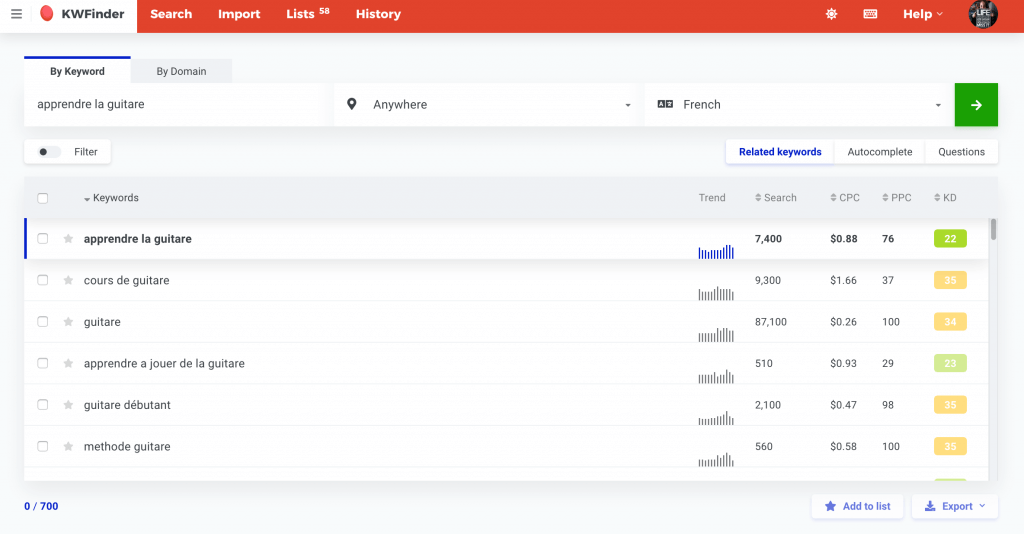
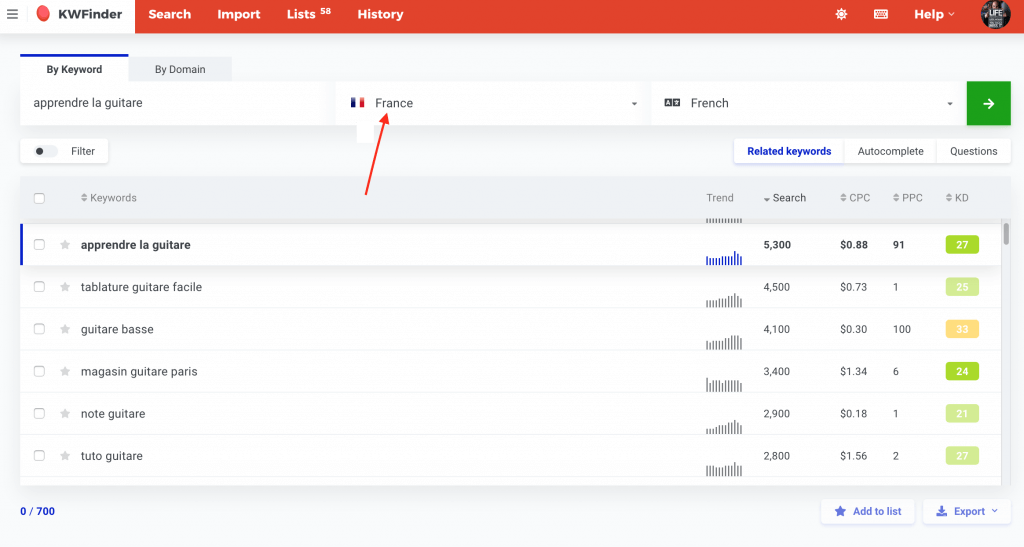
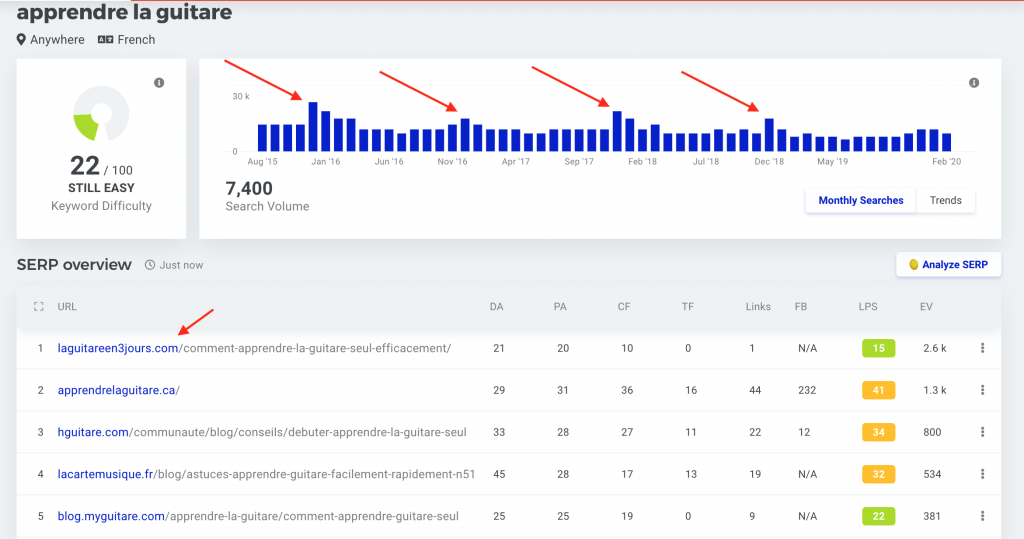
To give you an idea of KWFinder’s possibilities, let’s consider a concrete example. Suppose we want to research the term “Learn guitar” in France. Here’s what we can do:
- Search volume: We can see that the estimated search volume for “Learn guitar” in France is 5,300 per month, with moderate competition.
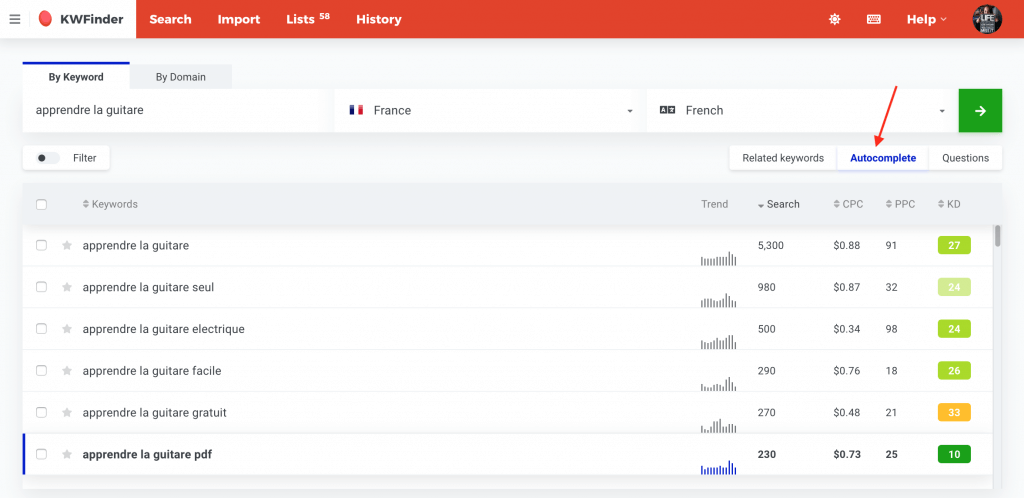
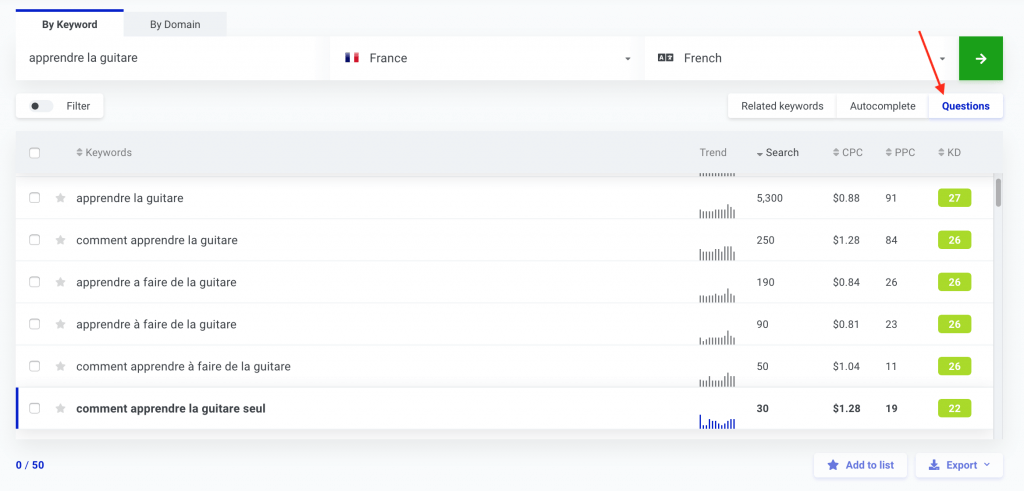
- Long-tail keywords: We can switch tabs to see related long-tail keywords, such as “Learn to play guitar PDF,” which has virtually no competition.
- Trend picture: We can view a trend picture to see how interest in learning guitar varies over time.
- Quote from Google: We can see which websites are ranking on the first page of Google for our target keyword.
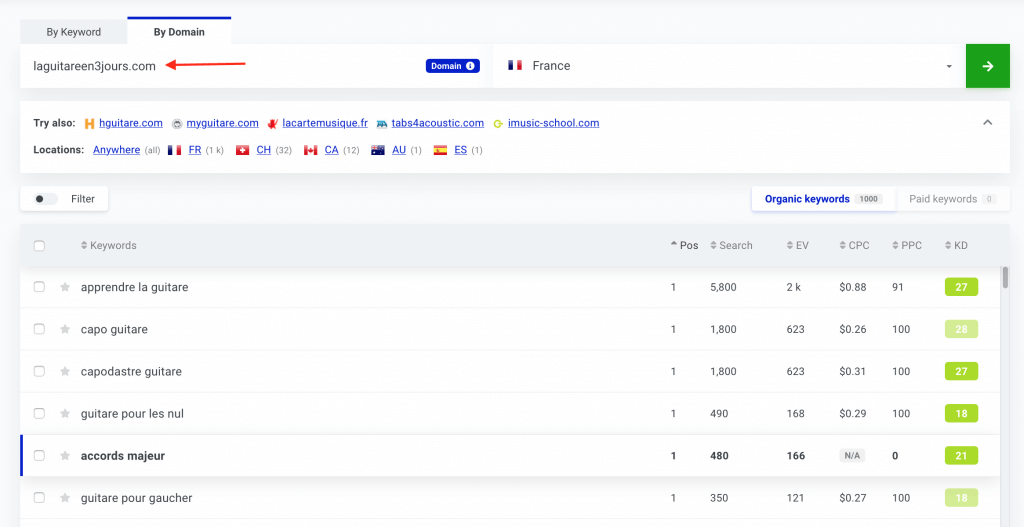
- Search by domain name: We can search by domain name to see which keywords a website is well-positioned for.
Using KWFinder, we can gain valuable insights into our target keyword and identify opportunities for optimization.
Additional Features of KWFinder
Some other features of KWFinder include:
- Make a list of keywords: We can create a list of keywords based on a topic and save it for future use.
- View paid search results: We can view paid search results (Google Ads) to see which ads are ranking for our target keyword.
- EV (expected to visit): We can estimate the number of visits a particular website gets according to its position.
- Cost-per-click and difficulty keywords: We can estimate the cost-per-click and difficulty of keywords for paid campaigns.
In conclusion, KWFinder is a powerful keyword research and analysis tool that offers a range of features and benefits. While it may have some limitations, its ease of use, affordability, and fast support make it an attractive option for bloggers, affiliate marketers, and small companies. Whether you are a novice or a seasoned webmaster, KWFinder is definitely worth considering for your SEO needs.
Recommendation
If you are looking for a keyword research tool that is easy to use, affordable, and provides valuable insights, KWFinder is an excellent choice. With its intuitive UI, powerful data aggregation, and fast support, KWFinder is an ideal tool for anyone looking to improve their online presence.
Rating
Based on our review, we give KWFinder a rating of 4.5 out of 5 stars. The only drawbacks are its limitations for heavy users and the closed keyword results. However, these limitations are minor compared to the tool’s many benefits.
SERP Checker: The Ultimate Google Position Checker
In the world of search engine optimization (SEO), understanding how your website ranks on Google is crucial for driving organic traffic and increasing online visibility. One of the most effective tools for analyzing your website’s position on Google is the SERP Checker, a feature-rich application suite offered by Mangools. In this article, we will delve into the features and benefits of using SERP Checker, and how it can help you optimize your website’s content and improve your search engine rankings.
What is SERP Checker?
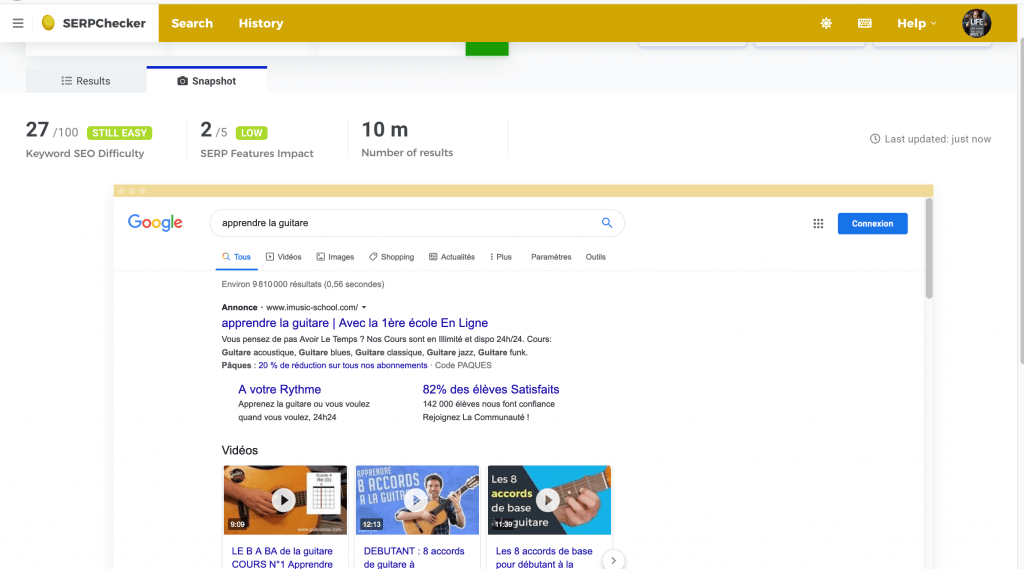
SERP Checker is a powerful tool that allows you to quickly analyze the Google search results for a specific keyword or phrase. With this tool, you can gain valuable insights into what type of content is highlighted, who your competitors are, and what their strengths and weaknesses are. By checking your keywords, you can determine whether the keyword you are targeting is “affordable” and feasible to rank for.
Key Features of SERP Checker
Some of the key features of SERP Checker include:
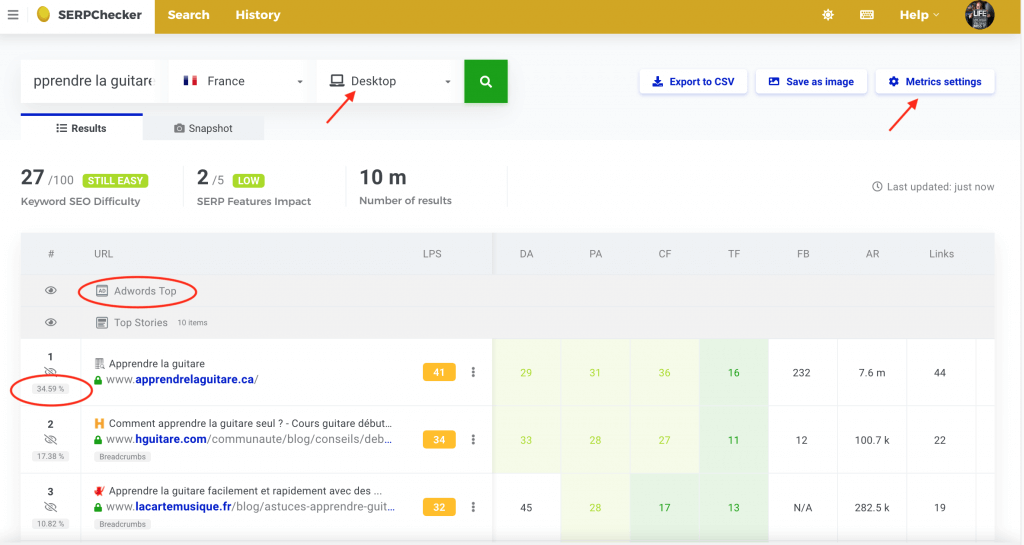
- Quick analysis of Google search results: Get a snapshot of the top search results for your target keyword, including the content type, rich snippets, and FAQs.
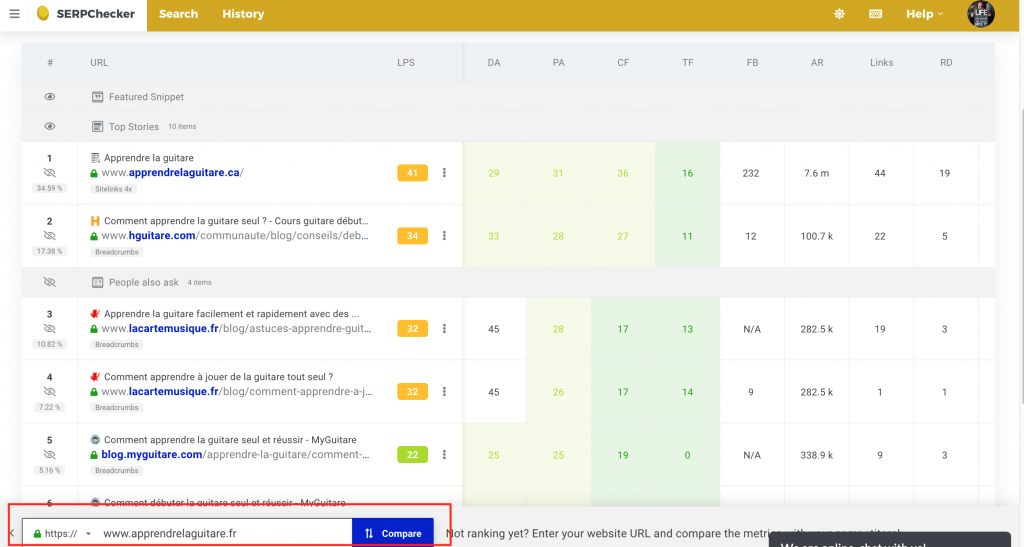
- Competitor analysis: Identify your competitors and analyze their strengths and weaknesses, including their domain authority, page authority, and backlink profile.
- Mobile and desktop search results: Choose whether you want to analyze mobile or desktop search results, or compare both to identify any differences.
- Click-through rate (CTR) estimation: Get an estimate of the CTR for each search result, helping you understand what makes people click on a particular result.
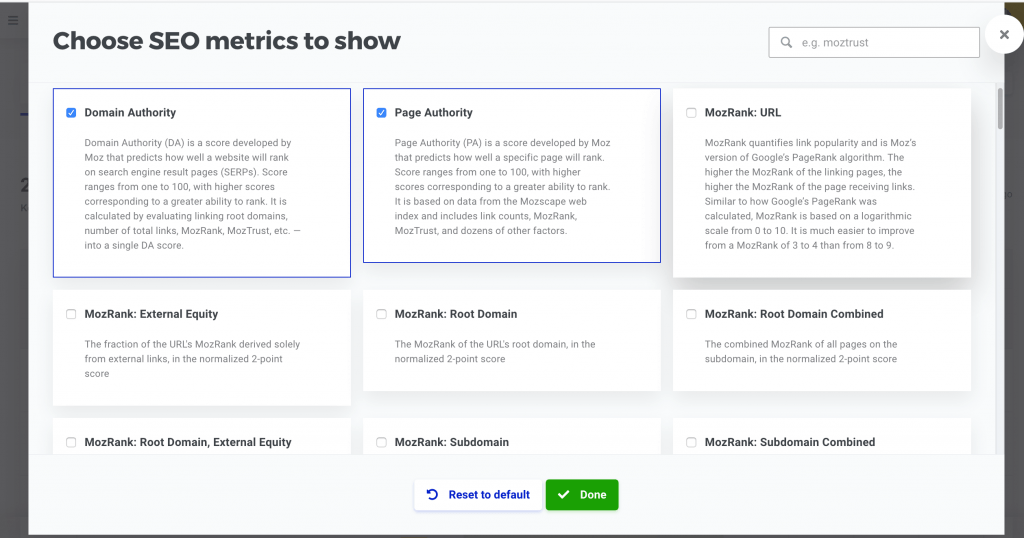
- Customizable metrics: Adjust the metrics displayed in the SERP Checker, including MOZ DA, PA, Citation Flow, and more.
- Country and region selection: Compare search results for different countries and regions to identify any geographical differences.
Benefits of Using SERP Checker
Using SERP Checker can bring numerous benefits to your SEO efforts, including:
- Improved keyword research: Get a better understanding of whether your target keyword is feasible to rank for, and adjust your strategy accordingly.
- Enhanced content optimization: Use the insights from SERP Checker to optimize your content, including the type of content, meta tags, and internal linking.
- Competitor analysis: Identify gaps in your competitor’s strategy and capitalize on them to improve your own rankings.
- Increased online visibility: By optimizing your content and improving your search engine rankings, you can increase your online visibility and drive more organic traffic to your website.
How to Use SERP Checker
Using SERP Checker is straightforward and easy. Here’s a step-by-step guide:
- Enter your target keyword: Type in the keyword or phrase you want to analyze.
- Choose your country and region: Select the country and region you want to analyze.
- Select mobile or desktop search results: Choose whether you want to analyze mobile or desktop search results.
- Analyze the search results: Review the search results, including the content type, rich snippets, and FAQs.
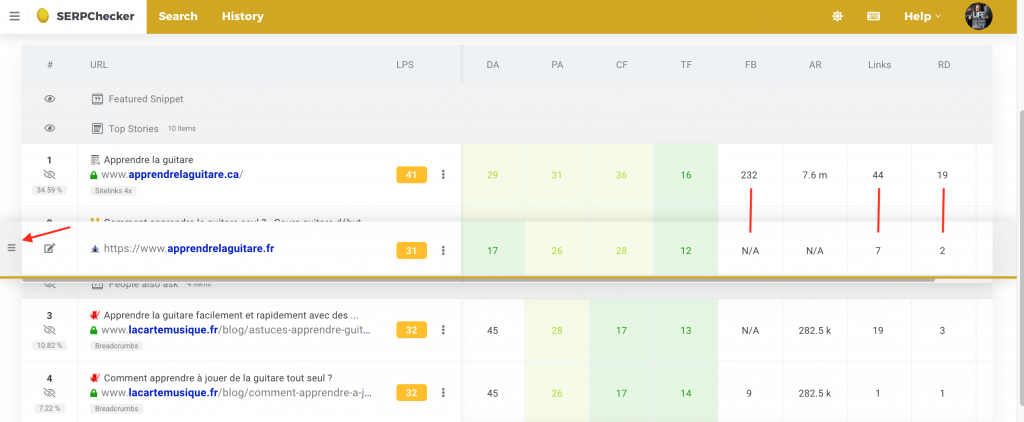
- Compare your website: Enter your website’s URL to compare your own site’s metrics with those of your competitors.
- Adjust the metrics: Customize the metrics displayed in the SERP Checker to suit your needs.
Tips and Tricks
Here are some tips and tricks to get the most out of SERP Checker:
- Analyze your competitor’s strengths and weaknesses: Identify gaps in your competitor’s strategy and capitalize on them.
- Use the CTR estimation feature: Get an estimate of the CTR for each search result to understand what makes people click.
- Compare mobile and desktop search results: Identify any differences between mobile and desktop search results to optimize your content accordingly.
- Adjust the metrics: Customize the metrics displayed in the SERP Checker to suit your needs and focus on the most important metrics for your SEO strategy.
SERP Checker is a powerful tool that can help you optimize your website’s content and improve your search engine rankings. By analyzing the Google search results for your target keyword, you can gain valuable insights into what type of content is highlighted, who your competitors are, and what their strengths and weaknesses are. With its customizable metrics, country and region selection, and CTR estimation feature, SERP Checker is an essential tool for any SEO professional or business owner looking to improve their online visibility and drive more organic traffic to their website.
SERPWatcher: The Ultimate Tool for Analyzing and Tracking Google Positions
As a website owner or blogger, taking your Search Engine Optimization (SEO) efforts seriously is crucial for online success. One of the most important tools to have in your arsenal is SERPWatcher, a powerful application designed to track and analyze your Google positions. In this article, we will explore the importance of SERPWatcher and how it can help you refine your SEO strategy.
The Importance of Tracking Your Google Positions
When it comes to SEO, keyword research is often considered the foundation of a successful campaign. However, tracking your Google positions is just as crucial, yet often underestimated by many bloggers and website owners. Without a reliable tracking system, you may never know whether your strategy is working or if you’re experiencing a sharp decline in your keyword rankings.
The Challenges of Manual Tracking
For those targeting only one or a few keywords, manually checking positions in Google and storing data in an Excel file may be feasible. However, as your keyword list grows, this task becomes increasingly time-consuming and impractical. This is where SERPWatcher comes into play, offering a streamlined solution for tracking and analyzing your Google positions.
How SERPWatcher Works
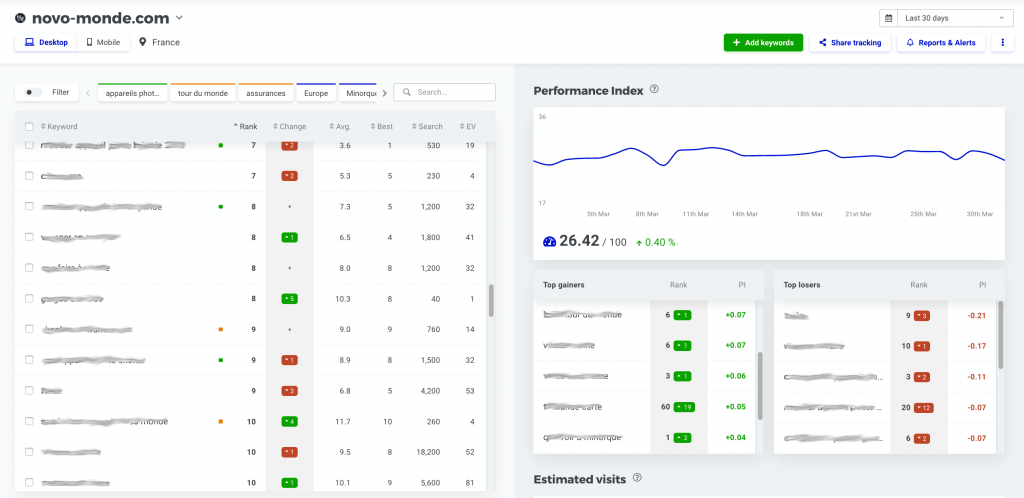
SERPWatcher allows you to visualize all your keywords, as well as their evolution over time, in a global or geolocalized manner. This application provides a comprehensive overview of your keyword performance, enabling you to:
- Track keyword positions: Monitor your keyword rankings and identify trends, patterns, and changes in your search engine rankings.
- Analyze position evolution: Study the evolution of your keyword positions over time, allowing you to refine your SEO strategy and make data-driven decisions.
- Set up alerts: Receive notifications when your keyword rankings change, ensuring you stay on top of sudden drops or rises in your positions.
Benefits of Using SERPWatcher
By utilizing SERPWatcher, you can:
- Optimize your SEO strategy: Make informed decisions about your content strategy and keyword targeting, based on real-time data and analysis.
- Detect sudden changes: Quickly identify sudden drops or rises in your keyword rankings, enabling you to respond promptly and minimize potential losses.
- Improve your online visibility: Enhance your website’s online presence by refining your keyword targeting and content strategy, leading to increased traffic and engagement.
Key Features of SERPWatcher
Some of the key features of SERPWatcher include:
- Keyword tracking: Track multiple keywords and phrases across different search engines and locations.
- Position analysis: Analyze your keyword positions over time, identifying trends and patterns in your search engine rankings.
- Alerts and notifications: Receive notifications when your keyword rankings change, ensuring you stay up-to-date with the latest developments.
- Geolocalized tracking: Track your keyword positions in different locations, allowing you to tailor your SEO strategy to specific regions and markets.
In conclusion, SERPWatcher is an essential tool for anyone serious about SEO. By tracking and analyzing your Google positions, you can refine your content strategy, detect sudden changes, and improve your online visibility. Whether you’re a seasoned SEO expert or just starting out, SERPWatcher provides a powerful solution for optimizing your SEO efforts and achieving online success.
Best Practices for Using SERPWatcher
To get the most out of SERPWatcher, consider the following best practices:
- Regularly monitor your keyword positions: Keep track of your keyword rankings and adjust your SEO strategy accordingly.
- Analyze your position evolution: Study the evolution of your keyword positions over time, identifying trends and patterns in your search engine rankings.
- Set up alerts and notifications: Receive notifications when your keyword rankings change, ensuring you stay on top of sudden drops or rises in your positions.
- Refine your SEO strategy: Use the insights gained from SERPWatcher to refine your content strategy and keyword targeting, leading to improved online visibility and engagement.
Unlocking the Power of Backlinks with LinkMiner: A Comprehensive Review
In the realm of search engine optimization (SEO), backlinks play a crucial role in determining the credibility and visibility of a website. While some may argue that actively seeking backlinks is essential, others believe that producing high-quality content is enough to attract them naturally. In this article, we will delve into the world of backlinks and explore how LinkMiner, a tool from the Mangools Suite, can help you analyze and optimize your backlink profile.
The Importance of Backlinks
Backlinks are essentially links from other websites that point to your content. The idea behind backlinks is that when a reputable website links to your content, it signals to search engines that your content is valuable and worthy of attention. The more high-quality backlinks you have, the higher your website is likely to rank in search engine results pages (SERPs). Here are some key benefits of backlinks:
- Improved credibility: Backlinks from authoritative websites can increase your website’s credibility and trustworthiness.
- Increased visibility: Backlinks can drive referral traffic to your website and increase your online visibility.
- Better search engine rankings: High-quality backlinks can improve your website’s search engine rankings and increase your chances of appearing on the first page of search results.
How to Get Backlinks
While some website owners may not actively seek backlinks, there are ways to encourage other websites to link to your content. Here are some common methods:
- Guest blogging: Write guest posts for other websites and include a link to your website in your author bio or within the content.
- Email outreach: Reach out to other website owners and ask them to link to your content. You can offer to write a guest post or provide valuable insights in exchange for a link.
- Content promotion: Share your content on social media and other online platforms to increase its visibility and attract links.
- Resource pages: Create a resource page on your website that links to other high-quality websites in your niche. This can encourage other websites to link back to you.
Introducing LinkMiner
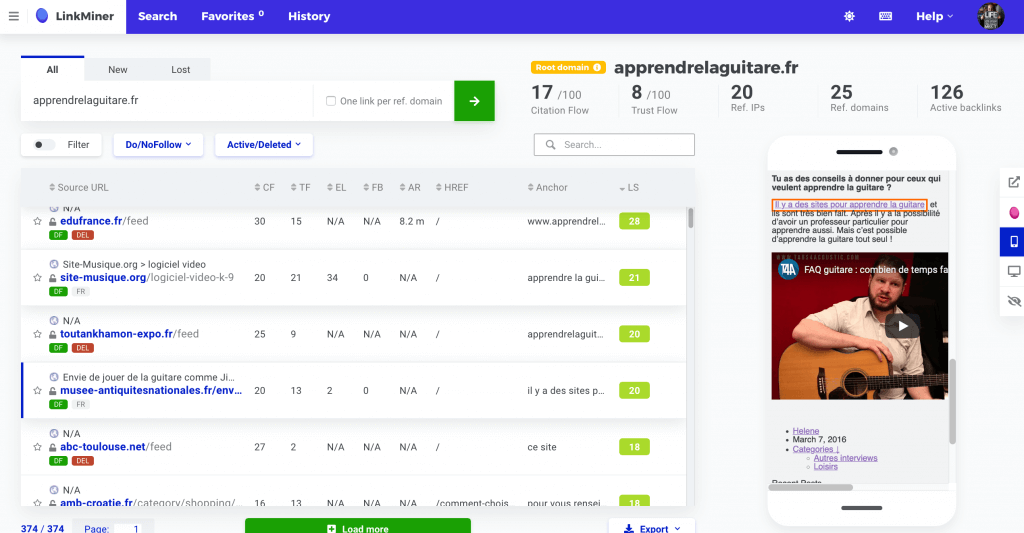
LinkMiner is a powerful tool from the Mangools Suite that allows you to analyze and optimize your backlink profile. With LinkMiner, you can:
- View your backlinks: See all the links that currently point to your website, including the URL, anchor text, and link type (do-follow or no-follow).
- Analyze deleted links: Identify links that have been removed and contact the website owner to ask why.
- Visualize link placement: See where your links are placed on external websites, including the URL, anchor text, and surrounding content.
- Analyze competitor backlinks: View the backlinks of your competitors and identify opportunities to acquire similar links.
Using LinkMiner to Improve Your Backlink Profile
LinkMiner is a valuable tool for any website owner looking to improve their backlink profile. Here are some ways to use LinkMiner to optimize your backlinks:
- Identify low-quality links: Use LinkMiner to identify low-quality links that may be harming your website’s credibility and remove them.
- Find link opportunities: Analyze your competitors’ backlinks and identify opportunities to acquire similar links.
- Optimize link anchor text: Use LinkMiner to optimize your link anchor text and improve your website’s keyword rankings.
- Monitor link growth: Use LinkMiner to monitor your link growth and identify areas for improvement.
In conclusion, backlinks are a crucial aspect of SEO, and LinkMiner is a powerful tool that can help you analyze and optimize your backlink profile. By understanding the importance of backlinks and using LinkMiner to identify opportunities and optimize your links, you can improve your website’s credibility, visibility, and search engine rankings. Whether you’re a seasoned SEO expert or just starting out, LinkMiner is a valuable tool that can help you unlock the power of backlinks and take your website to the next level.
Here are some key takeaways from this article:
- Backlinks are essential for SEO: High-quality backlinks can improve your website’s credibility, visibility, and search engine rankings.
- LinkMiner is a powerful tool: LinkMiner allows you to analyze and optimize your backlink profile, including viewing your backlinks, analyzing deleted links, and visualizing link placement.
- Optimize your link profile: Use LinkMiner to identify low-quality links, find link opportunities, optimize link anchor text, and monitor link growth.
- Stay ahead of the competition: Analyze your competitors’ backlinks and identify opportunities to acquire similar links and improve your website’s search engine rankings.
SITEPROFILER – THE ULTIMATE WEBSITE ANALYSIS TOOL
In today’s digital landscape, understanding your website’s performance and that of your competitors is crucial for success. This is where SiteProfiler, the fifth and final application of the Mangools suite, comes into play. As a comprehensive website analytics tool, SiteProfiler provides an in-depth analysis of your website or that of your competitors, giving you valuable insights to inform your online strategy.

How SiteProfiler Works
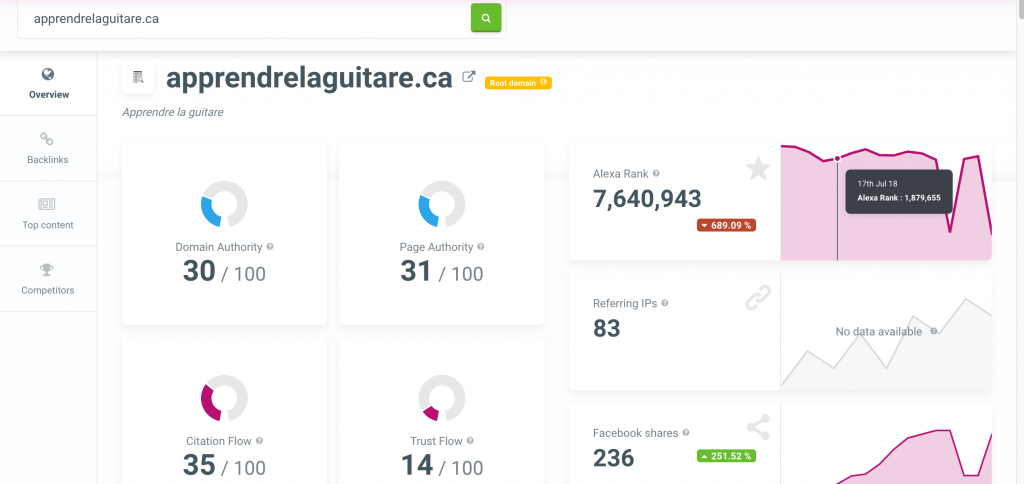
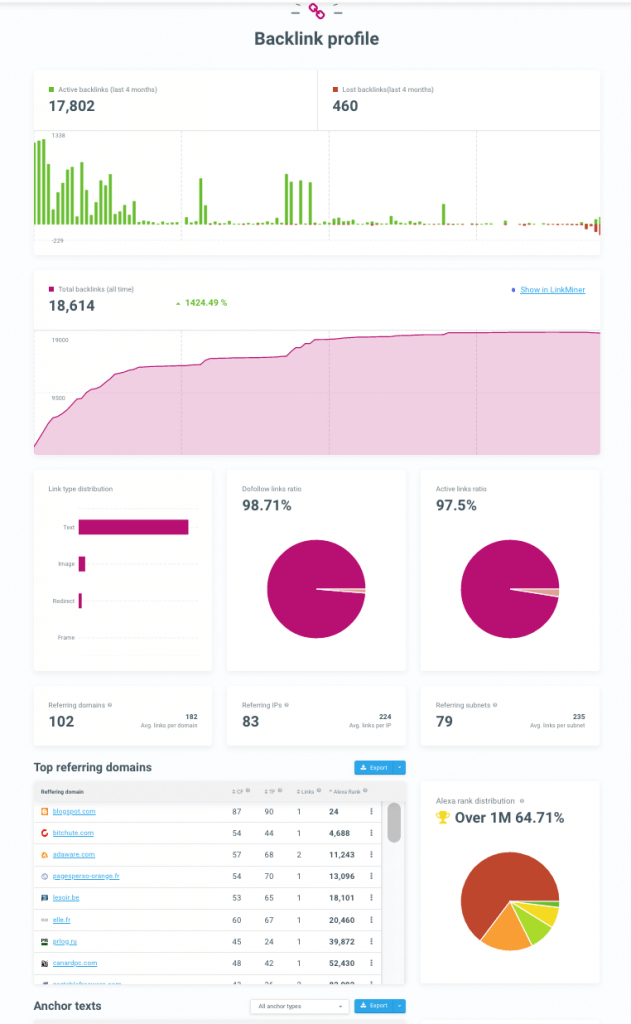
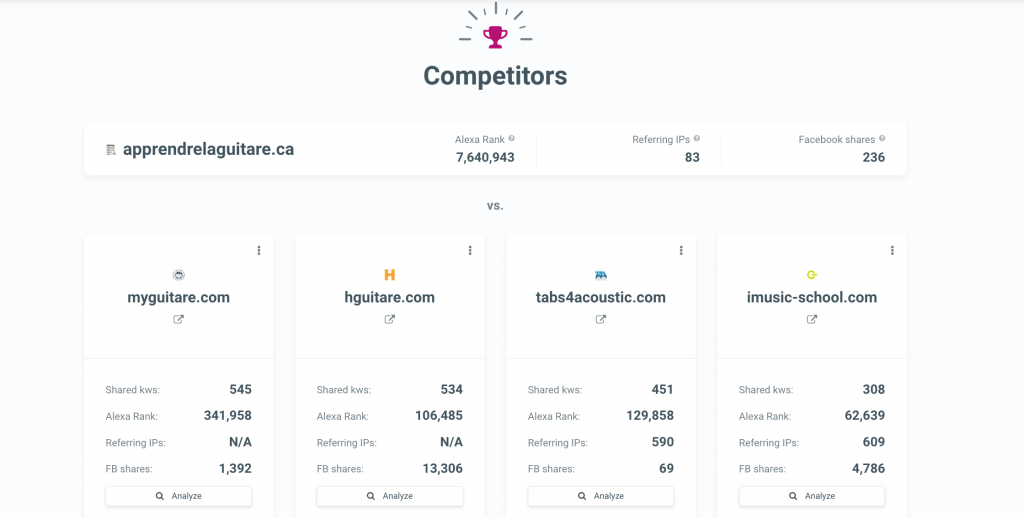
By simply entering a URL, you can gain a complete picture of your website or that of your competitors. The analysis is divided into four main sections, each providing unique insights into different aspects of the website.
Section 1: Domain Analysis
The first section of the analysis focuses on the domain name authority, including:
- MOZ Domain Authority
- Page Authority
- Majestic Citation Flow
- Trust Flow
These metrics provide a comprehensive overview of the website’s credibility and authority in its niche.
Section 2: Backlink Analysis
The second section delves into the website’s backlink profile, including:
- Number of backlinks added or removed over time
- Evolution of the overall number of links
- Types of links (dofollow or nofollow)
- Primary domain names that point to the site
- Anchor text of the links
This information helps you understand the website’s link building strategy and identify potential areas for improvement.
Section 3: Content Analysis
The third section focuses on the website’s best content, ranked based on either:
- Number of Facebook shares
- Number of backlinks to the content
This section is particularly useful for identifying content that resonates with your target audience and inspiring the creation of new articles. However, it’s essential to remember to add real value to your content and avoid copying existing content, as this can be counterproductive.
Section 4: Competitor Analysis
The final section provides a list of websites that Mangools considers to be competitors of the analyzed site. This feature allows you to:
- Identify potential competitors if you analyze your own site
- Gain a better understanding of the market and compare your website to that of your competitors if you analyze a competitor’s site
For each competing site, you can immediately start an analysis or display a link back to the site using LinkMiner.
Key Features of SiteProfiler
Some of the key features of SiteProfiler include:
- Comprehensive analysis: SiteProfiler provides an in-depth analysis of your website or that of your competitors, covering domain authority, backlinks, content, and competitors.
- Easy to use: The tool is user-friendly, with a simple and intuitive interface that makes it easy to navigate and understand the data.
- Actionable insights: SiteProfiler provides actionable insights that can inform your online strategy and help you improve your website’s performance.
- Competitor analysis: The tool allows you to identify and analyze your competitors, giving you a better understanding of the market and helping you stay ahead of the competition.
Benefits of Using SiteProfiler
The benefits of using SiteProfiler include:
- Improved website performance: By analyzing your website’s strengths and weaknesses, you can identify areas for improvement and optimize your online strategy.
- Increased competitiveness: SiteProfiler’s competitor analysis feature helps you stay ahead of the competition by identifying gaps in the market and opportunities for growth.
- Data-driven decision making: The tool provides actionable insights that can inform your online strategy, helping you make data-driven decisions that drive results.
- Time-saving: SiteProfiler saves you time and effort by providing a comprehensive analysis of your website and competitors in one easy-to-use tool.
In conclusion, SiteProfiler is a powerful website analysis tool that provides a comprehensive overview of your website or that of your competitors. With its easy-to-use interface, actionable insights, and competitor analysis feature, SiteProfiler is an essential tool for any online business looking to improve its website performance and stay ahead of the competition.
Table: SiteProfiler Features
| Feature | Description |
|---|---|
| Domain Analysis | Analyzes domain name authority, including MOZ Domain Authority, Page Authority, Majestic Citation Flow, and Trust Flow |
| Backlink Analysis | Analyzes backlink profile, including number of backlinks, types of links, and anchor text |
| Content Analysis | Ranks best content based on Facebook shares or backlinks |
| Competitor Analysis | Identifies and analyzes competing websites |
By using SiteProfiler, you can gain a deeper understanding of your website and competitors, and make data-driven decisions that drive results. Whether you’re looking to improve your website’s performance, increase your competitiveness, or simply stay ahead of the curve, SiteProfiler is the ultimate website analysis tool for you.
My Opinion on Mangools (KWFinder): A Game-Changer in Keyword Research
As a digital marketing professional, I have had the opportunity to use various keyword research tools, including Longtail Pro. However, after making the switch to Mangools three years ago, I can confidently say that I have no regrets. In fact, I’m happy to report that I won’t be returning to my old tool anytime soon. So, what makes Mangools stand out from the competition? Let’s dive in and explore the features that have won me over.
Why Mangools?
Here are just a few reasons why I prefer Mangools over other keyword research tools:
- User-friendly interface: The user interface of Mangools is sleek and easy to navigate, making it a pleasure to use.
- Comprehensive suite of tools: Mangools offers a range of tools, including KWFinder, SERPWatcher, and SERPChecker, which provide a complete solution for keyword research and SEO analysis.
- Exceptional customer service: The live chat support is always available and provides accurate and fast answers to any questions I may have.
The Star of the Show: KWFinder
KWFinder is, without a doubt, the standout tool in the Mangools suite. It’s the most powerful keyword research tool on the market, and its affordability makes it an unbeatable value. With KWFinder, I can:
- Find relevant keywords: Identify profitable keywords with low competition and high search volume.
- Analyze SERPs: Get insights into the top-ranking pages and their strengths and weaknesses.
- Track keyword performance: Monitor my keyword rankings and adjust my strategy accordingly.
Other notable tools in the Mangools suite
In addition to KWFinder, Mangools offers two other powerful tools:
- SERPWatcher: A keyword tracking tool that helps me monitor my rankings and adjust my strategy.
- SERPChecker: A tool that provides insights into the top-ranking pages and their strengths and weaknesses.
Understanding Mangools’ Pricing Tiers
Mangools offers three main pricing tiers: Entry, Basic, and Premium. Each tier is designed to cater to different user needs, from individuals and small businesses to large enterprises. The pricing is as follows:
| Plan | Monthly Price | Annual Price |
|---|---|---|
| Entry | $14.95 | $12.45/month (billed annually) |
| Basic | $22.45 | $29.90/month (billed annually) |
| Premium | $44.95 | $49.90/month (billed annually) |
Breaking Down Each Plan
Let’s take a closer look at what each plan has to offer:
- Entry Plan: This plan is ideal for those who want to dip their toes into the world of SEO without breaking the bank. With the Entry plan, you’ll get access to all Mangools tools, including KWFinder, with limited daily lookups.
- Basic Plan: The Basic plan is a step up from the Entry plan, offering 100 keyword research lookups per day, 100 SERP lookups, and 200 tracked keywords. This plan is suitable for small businesses and individuals who need to conduct regular keyword research.
- Premium Plan: The Premium plan is designed for larger businesses and agencies that require more advanced features and higher lookup limits. With this plan, you’ll get unlimited keyword suggestions, making it an ideal choice for those who need to conduct extensive keyword research.
After using Mangools for three years, I can confidently say that it’s the best keyword research tool on the market. The user-friendly interface, comprehensive suite of tools, and exceptional customer service make it an unbeatable value. If you’re looking for a powerful and affordable keyword research tool, I highly recommend giving Mangools a try. With its range of features and tools, it’s sure to take your digital marketing efforts to the next level.
Final Thoughts
In the world of SEO, keyword research is a crucial step in creating a successful online presence. With KWFinder, you can gain valuable insights into your target keywords and identify opportunities for optimization. Whether you are a blogger, affiliate marketer, or small company, KWFinder is an excellent choice for your SEO needs.