A Comprehensive Overview
In the digital age, blogging has emerged as a powerful medium for self-expression, information dissemination, and community building. At the forefront of this blogging revolution is WordPress.com, a platform that has redefined the way individuals and organizations connect with their audience. Owned and hosted by Automattic, WordPress.com operates on a modified version of the iconic open-source software, WordPress. Let’s delve deeper into what makes WordPress.com a leading choice for bloggers across the globe.
WordPress.com has its roots in the early 2000s when the idea of a user-friendly blogging platform became increasingly relevant. The site opened to beta testers on August 8, 2005, and welcomed the public on November 21, 2005. Initially, it was an invitation-only service that later expanded to include users of the Flock web browser. Since its launch, WordPress.com has grown exponentially, evolving into one of the most widely utilized platforms for bloggers.
Initially designed as a blogging platform, WordPress has undergone significant transformations over the years. The introduction of custom post types and a robust taxonomy system turned it into a highly flexible content management system (CMS), accommodating a wide variety of website types beyond traditional blogs. From e-commerce sites to portfolios and educational platforms, WordPress has established itself as a versatile solution for diverse use cases.
Key milestones in its history include:
- 2005: Launch to beta testers and subsequently to the public.
- 2010: Partnership with Microsoft, as it announced the closure of Windows Live Spaces, allowing former users to migrate to WordPress.com.
- 2017: Reported over 77 million new posts and 42.7 million comments published monthly.
Why WordPress.com Hosting?
In the vast ocean of the internet, finding the right platform to establish your online presence can feel like searching for a needle in a haystack. For many, the answer lies in WordPress.com, a powerful yet user-friendly hosting option that simplifies web creation and management. Powering an impressive 31% of all websites globally, WordPress has evolved from a blogging platform to a versatile content management system (CMS) that caters to various needs—from personal blogs to e-commerce solutions.
Ease of Use: A Gateway for Everyone
One of the most compelling reasons to choose WordPress.com is its inherent accessibility. Designed with beginners in mind, the platform allows users to set up their websites quickly and efficiently. The core of WordPress.com lies in its intuitive interface, which eliminates the technical complexities often associated with web development. Users can easily navigate through the platform, making it possible even for those without prior coding experience to launch a functional, aesthetically pleasing website.
Excellent Blogging Features
WordPress.com inherits the robust blogging features that originally set WordPress apart from other website builders. These features include easy content creation, an array of customizable themes, and an emphasis on search engine optimization (SEO). Additionally, WordPress.com supports multimedia integration, enabling users to incorporate images, videos, and audio effortlessly. For anyone looking to share their thoughts, ideas, or expertise, the platform provides the perfect environment for blogging.
Support for Third-Party Plugins
An exceptional feature of WordPress is its extensive ecosystem of third-party plugins. These plugins enhance and extend the platform’s functionality, enabling users to integrate various tools and capabilities into their sites. From e-commerce systems to social media sharing tools and SEO enhancements, WordPress.com supports a wide array of plugins.
However, it’s essential to note that in order to configure many of these plugins effectively, users must navigate away from WordPress.com’s comfortable and user-friendly interface and enter WP-Admin. WP-Admin is the more technical side of WordPress, often overwhelming for new users but necessary for deeper customization and advanced features.
A Transparent Pricing Structure
While WordPress.com offers a free basic version, it also provides several premium plans. These plans include enhanced features and support, appealing to users looking to elevate their websites. Options to upgrade typically include enhanced storage, custom domain names, and ad removal, allowing users to choose the level of service that fits their requirements.
Additionally, the platform offers services like Akismet, an effective anti-spam software, alongside hosting partnerships with major media outlets. This creates a reliable environment where users can concentrate on their content without worrying about technical malfunctions or security issues.
Security and Maintenance
For small business owners and bloggers alike, security is a significant concern. WordPress.com takes security seriously, providing various tools and features aimed at safeguarding user content. Since the platform is managed on the backend, users benefit from automatic updates, ensuring that core software, plugins, and themes are consistently kept up-to-date. This type of maintenance relieves users of the burden of constant manual updates, allowing them to focus on what truly matters—creating exceptional content.
Customer Support When You Need It
Unlike some other website-building platforms, WordPress.com offers comprehensive customer support, particularly with its premium plans. Users can access assistance for troubleshooting issues or learning how to utilize specific features effectively. The extensive documentation available also serves as a valuable resource for those looking to deepen their understanding of the platform.
The success of WordPress.com can be attributed to its multifaceted approach to blogging. It offers a balance of accessibility for beginners and advanced features for seasoned bloggers. Here are some reasons why users are drawn to the platform:
- User-Friendly Interface: WordPress.com is designed with convenience in mind, requiring no technical know-how to set up. Users can create a blog within minutes using a plethora of available themes and templates.
- Free Basic Features: The platform offers a robust free plan that includes basic blogging functionalities, making it an appealing option for newcomers.
- Community and Networking: With millions of users globally, bloggers can discover and engage with a diverse community, fostering collaboration and growth.
- Scalability: As individuals or organizations grow, WordPress.com provides paid upgrades and services that allow them to enhance their blogging experience without changing platforms.
The Benefits of WordPress.com Hosting
WordPress.com offers a plethora of features and advantages that cater to a wide range of users. Here are some compelling reasons to consider hosting your site on WordPress.com:
1. User-Friendly Interface
- Intuitive Design: WordPress.com is designed with simplicity in mind. Users can easily navigate through the platform without needing extensive technical knowledge.
- No Coding Required: For those worried about complex coding, WordPress.com allows you to create and manage your site without writing a single line of code.
2. Robust Blogging Features
- Enhanced Writing Tools: As a platform that started as a blogging service, WordPress.com offers exceptional writing and publishing tools. From rich editing capabilities to media management, everything is streamlined for your convenience.
- SEO-Friendly: The platform provides built-in SEO best practices that help your content rank better in search engines, making it easier for readers to find you.
3. Customization Options
- Themes and Layouts: WordPress.com offers a wide range of customizable themes, allowing users to create a website that reflects their unique style and branding.
- Third-Party Plugins: Although the WP-Admin interface can be daunting for some, WordPress.com allows you to access an extensive library of third-party plugins. These plugins can dramatically enhance your site’s functionality. From membership systems to podcasts, there’s a plugin for virtually every need.
4. Pricing Flexibility
- Free Version Available: One of the standout features of WordPress.com is its basic version, which is free to use. This makes it accessible for individuals and businesses looking to establish an online presence without immediate financial commitments.
- Premium Features: For users who require advanced functionalities, WordPress.com provides various premium plans that unlock additional features and support.
5. Reliable Performance and Security
- State-of-the-Art Hosting: WordPress.com is known for its reliable hosting services, which ensure that your site remains operational, even during high-traffic periods.
- Security Features: Security is paramount in today’s digital world, and WordPress.com takes this seriously. The platform includes built-in security measures to protect your site from malware and hacking attempts.
6. Community Support and Resources
- Strong Community: One of the significant advantages of using WordPress.com is the support from a vast community of users and developers. Whether you’re looking for advice or troubleshooting assistance, you can easily find help.
- Extensive Documentation: WordPress.com offers comprehensive resources, tutorials, and guides that help users maximize their experience on the platform.
7. E-commerce Capabilities
- E-store Support: If you’re looking to sell products online, WordPress.com offers built-in e-commerce features that allow you to set up an online store with ease. With secure payment options and customizable storefronts, it’s an excellent choice for budding entrepreneurs.
8. Mobile Responsiveness
- Designed for All Devices: Websites on WordPress.com are automatically optimized for mobile devices, ensuring that your site looks great and functions well on smartphones and tablets.
Understanding the WP-Admin Interface
While WordPress.com is known for its friendly user interface, users may occasionally need to venture into the WP-Admin dashboard for advanced configurations. Here are some key points about this interface:
- Complexity: Compared to the streamlined nature of WordPress.com, the WP-Admin interface can be more complex. Familiarizing yourself with this dashboard is essential for specific site configurations.
- Configuration Needs: Most plugins and advanced features require you to access WP-Admin for proper setup. Although this may seem daunting, resources abound to help you navigate this interface with confidence.
Basic Features Available for Free Users:
- Blog Hosting: Users can register for free and start a blog immediately.
- Customizable Themes: A selection of themes allows customization to align with the blogger’s vision.
- Engagement Tools: Features like likes, comments, and shares help foster community interaction.
- Mobile Optimization: Blogs are automatically optimized for mobile devices.
Features Not Included in the Free Plan:
For those looking for more specific functionalities, the following features require a paid subscription:
- Install PHP Plugins: Enhance your blog’s functionality with various plugins.
- Custom CSS: Tailor the design of your theme with custom styles.
- Domain Mapping & Registration: Create a unique brand identity by registering a personal domain.
- Removal of Ads: Enjoy an ad-free experience for your readers.
- Video Uploads and Storage Upgrades: Host videos directly on your blog and expand storage options.
- Website Redirection: Direct visitors from old URLs to new ones effortlessly.
Create Your Website Anywhere, Anytime with WordPress.com
In the ever-evolving digital landscape, having a website is non-negotiable for businesses, brands, and individuals seeking an online presence. WordPress.com emerges as a powerful platform, enabling you to establish a comprehensive website with ease. Whether you’re on a smartphone, tablet, or desktop, WordPress.com offers the tools and flexibility to create and manage a dynamic site from virtually anywhere.
Comprehensive Business Solutions
WordPress.com is not just about creating websites; it’s about empowering businesses with tools that enhance functionality and user experience. The following features are included in premium plans that set them apart:
Unlimited Premium Themes
With access to unlimited premium and business theme templates, you can create a unique website tailored to your brand identity.
Advanced Design Tools
Employ advanced design customization options such as CSS editing to create a distinctive look for your website. Here are additional design customization features:
- Custom Domain Names: Establish credibility with a domain tailored to your business.
- Video and Audio Space: Upload audio and video resources seamlessly to enhance user engagement.
- Monetization Options: Easily incorporate ads and other monetization strategies to generate revenue.
Enhanced Support and Tools
Investing in a Business or Premium plan unlocks several key benefits:
- Email & Live Chat Support: High-quality, responsive support ensures you get help whenever you need it.
- Jetpack Essential Features: Enhance your website with powerful additional features inspired by popular plugins.
- Unlimited Storage Space: Never worry about space constraints—upload content freely.
- SEO Tools: Optimize your website for search engines and enhance your visibility.
A Simple Path to Monetization
Creating a website is just the starting point; monetization is often the goal. WordPress.com facilitates this through a variety of features:
- Simple Payments: Easily integrate payment options to sell products, services, or content on your site.
- Ad Management: Clean your site of third-party ads by removing WordPress.com branding, allowing you to present your offerings without distractions.
Moreover, with VideoPress support, you can share high-quality video content effortlessly, while Jetpack Search enriches the user experience on your website by enhancing how visitors find your content.
Educational Resources and Community Engagement
Developing a website is not just a technical task; it also involves understanding the intricacies of digital marketing and user engagement. WordPress.com assists you in this journey with:
- Live Courses: Attend live workshops to learn web development, SEO strategies, and more.
- Content Syncing: Connect your content to social media platforms like Facebook and Twitter to reach broader audiences.
Hosting and Security
Security is of utmost importance for any website, and WordPress.com delivers on this front by including robust security measures and hosting services. Features include:
- Regular Backups: Automatic backups ensure that your data is safe even in case of technical issues.
- Spam Protection: Keeping your website clean from unsolicited spam helps maintain an optimal user experience.
The Power of Customization
Having a custom look is essential for brand identity, and WordPress.com excels in this area. You can choose from over 300 themes, and the Business plan allows you to install any theme purchased elsewhere. This flexibility empowers you to implement unique design elements that resonate with your target audience and align with your business ethos.
Key Features of the WordPress.com Business Plan
When you opt for the business plan, you gain access to an extensive suite of tools and features. Here is a concise list to summarize what you can expect:
- Custom domain name for enhanced branding
- Access to advanced customization tools
- Unlimited storage space for all your content
- Ability to install plugins for added functionality
- Google Analytics integration to track your website’s performance
- Options to remove WordPress.com ads and branding
- Dedicated customer support through email and live chat
- SEO tools to enhance discoverability
- Monetization features to help you generate income from your site
Launching your website with WordPress.com not only simplifies the technical aspects but provides subject matter guidance that can inspire and elevate your ideas. With versatile features, aesthetic customization options, ample storage, and expert support, WordPress.com empowers you to create an exceptional website that not only meets your needs but also engages and converts your audience.
In today’s fast-paced digital world, choose a platform that adapts to you—whether you’re at home, on the go, or in the office. WordPress.com keeps you connected and creative, making it the ideal choice for anyone looking to establish or enhance their online presence. Take the first step today, and watch as your vision transforms into reality.
WordPress.com: Your Ultimate E-Commerce Solution
In today’s digital age, creating an online presence has become an absolute necessity for businesses of all sizes. Among numerous platforms available, WordPress.com stands out as a versatile and powerful solution, offering a comprehensive suite of e-commerce options designed to help individuals and businesses thrive. Whether you’re selling handmade goods, digital products, or services, WordPress.com provides all the tools you need to launch and manage a successful online store.
A Range of E-Commerce Options
1. Create an Online Store
WordPress.com simplifies the process of setting up an online store. Here’s how:
- Fully Integrated Solution: Publish content and sell products from a single platform, eliminating the need for external tools.
- Customization: With a variety of plugins and themes, you can tailor your store to reflect your brand’s identity.
- Shipping Solutions: Effortlessly sell and ship physical products, reaching customers around the globe.
- Real-Time Support: Gain access to concierge support, assisting you around the clock as you manage your online shop.
With WordPress.com Business plans, users can take advantage of custom plugins, Google Analytics, and unlimited storage to enrich their selling experience.
2. Sell Anything, Anywhere
WordPress.com is not limited to just one type of product. The platform supports diverse e-commerce models, allowing you to sell:
- Physical Goods: Whether you’re selling industry-specific items or homemade crafts, WordPress.com provides the resources to showcase and manage physical inventory.
- Digital Products: From eBooks to downloadable software, easily market and sell digital products without the need for complex setups.
- Subscriptions and Memberships: Offer subscription boxes or memberships to frequent customers, generating a steady stream of revenue.
- Donations: Easily accept donations for local organizations or personal projects with minimal setup through the Simple Payments feature.
The integration of WooCommerce allows for immense flexibility in how you manage your e-commerce site, letting you build a store that is uniquely yours.
3. Start Taking Payments in Seconds
Getting started with collecting payments is a breeze with WordPress.com. Here’s how:
- Simple Payments Feature: This allows you to set up credit and debit card payments from any page on your site with minimal effort.
- Advanced Design Tools: Ensure that the payment process aligns with your website’s design, providing a cohesive user experience.
- Monetization Opportunities: Beyond selling, you can monetize your website through advertisements, thus affording you additional income channels.
By opting for the WordPress.com Premium package, you can harness more advanced capabilities, further enhancing your store’s capabilities.
Best Practices for Dedicated E-Commerce
For those looking for a more dedicated e-commerce solution, consider moving to self-hosted WordPress and installing WooCommerce alongside custom extensions. This approach provides:
- Server Space: Purchase your own dedicated server space through recommended WordPress hosts.
- Customizability: Enjoy the luxury of installing multiple plugins and themes tailored specifically for e-commerce.
- Analytics: Gain insights into your store’s performance, driving growth through data-driven decision-making.
Powerful Statistics and Analytics
Keeping track of your store’s performance is essential for ongoing success. WordPress.com provides advanced statistics tools that help you:
- Understand Customer Behavior: Utilize colorful charts and graphs to see what products are popular and how customers are discovering your site.
- Optimize Strategies: Use data analytics to refine your marketing campaigns and product offerings, ensuring that your efforts play to your strengths.
These insights enable you to understand your audience better and adjust your strategies accordingly to boost conversions.
All-in-One Hosting Solution
One of the standout features of WordPress.com is its all-in-one hosting:
- Domain Registration: Secure your domain name while enjoying seamless website design.
- Automatic Software Updates: Stay secure and up-to-date with hassle-free updates that protect your site’s integrity.
- Secure Hosting: Your website is supported across multiple data centers, enhancing security and uptime.
By choosing WordPress.com, you can focus on growing your business without getting bogged down by technical details.
Optimized for Growth
WordPress.com is built for scalability. Here are key features to help your online store reach new heights:
- SEO Built-In: Search engine optimization features ensure that your products rank well in search results, driving organic traffic.
- Social Media Integration: Easily connect with social media platforms, allowing you to share products and promotions effortlessly.
- High-Traffic Network: By plugging into a vast network of WordPress sites, you can reach potential customers you never knew existed.
These tools are essential for reaching larger audiences and growing your customer base, making WordPress.com a robust partner for your e-commerce journey.
In conclusion, WordPress.com offers an all-encompassing e-commerce solution that empowers businesses to establish, manage, and grow their online stores seamlessly. With options for both beginners and seasoned e-commerce veterans, the platform provides everything from simple payment solutions to advanced customization capabilities. As businesses continue to pivot towards a digital-first strategy, WordPress.com ensures that you are well-equipped to meet the demands of today’s dynamic marketplace. It’s time to harness the power of WordPress.com and turn your e-commerce dreams into reality.
Exploring the Features of WordPress.com
As the digital landscape continues to evolve, more individuals and businesses are seeking effective tools to establish their online presence. WordPress.com emerges as a powerful solution, catering to diverse needs ranging from personal blogs to robust e-commerce platforms. T
Building an Audience
Creating a successful website is not only about design and content; it’s also about driving traffic and fostering engagement. WordPress.com provides a comprehensive set of features that simplify these tasks:
- Social Media Syndication: Automatically share your posts on popular social media platforms to reach a broader audience.
- Sharing Buttons: Integrated sharing options encourage readers to share your content with their networks, exponentially increasing visibility.
- SEO Tools: Built-in search engine optimization features improve the discoverability of your posts on Google and other search engines.
- Insightful Site Statistics: Monitor your site’s traffic and audience engagement through detailed analytics. This information helps you make informed decisions about content strategy.
- Ad Credits: Start with $100 in ad credits on WordPress.com, making it easier for you to promote your site and reach potential subscribers.
A Secure Website You Can Count On
Security is paramount in today’s digital age. WordPress.com offers robust features to ensure your website remains safe and operational:
- Automatic Backups: Your site is continuously backed up, providing peace of mind that your content is secure.
- Uptime Guarantee: Enjoy high availability and performance, ensuring that your site is accessible when your audience wants to visit.
- Anti-Spam Protection: Built-in features keep your site protected from unwanted spam comments and malicious attacks, allowing you to focus on creating quality content.
Expanding Your Website Functionality
WordPress.com offers a variety of features that allow you to enhance your site according to your specific needs:
- Advanced Galleries: Create and manage visually appealing galleries to showcase your images and videos.
- Forms and Polls: Engaging with your audience is easy with customizable forms and polls that can elicit feedback and interaction.
- Sophisticated Comments: Enhance engagement through features that allow users to comment on posts, including moderation tools to manage feedback.
Creating a Robust Website
One of the most appealing aspects of WordPress.com is its versatility. Whether you want a blog, a portfolio, or a fully-fledged business site, WordPress.com has you covered:
- Personal Blogs: Share your thoughts and experiences with a clean, organized layout.
- Business Sites: Promote your services or products effectively with built-in e-commerce capabilities.
- Portfolios: Display your professional work in an interactive and visually appealing manner.
Custom Domains
To carve out your unique space on the web, WordPress.com allows users to add custom domains. This feature comes with the added bonus of managing your domains right from the platform, giving you a centralized place for all your web needs.
Mobile-Friendly Design
In an era dominated by mobile browsing, having a responsive website is critical. WordPress.com enables you to create mobile-friendly sites effortlessly:
- Responsive Themes: Choose from a variety of themes that automatically adjust to different screen sizes, ensuring your content looks great on all devices.
- One-Click Mobile Site Creation: Easily optimize your site for mobile viewing without extensive technical knowledge.
Comprehensive Blogging Features
As a platform acclaimed for blogging, WordPress.com offers extensive features to support content creators:
- Post Organization: Utilize tags and categories to categorize posts for better accessibility.
- Drafts and Scheduling: Write drafts and schedule posts for future publishing, ensuring a consistent flow of content.
- Team Contributions: Collaborate with other writers by adding team members who can contribute to your blog.
E-commerce Capabilities
For entrepreneurs looking to sell online, WordPress.com provides essential e-commerce functionalities:
- Flexible Promotions Editor: Create discounts and coupon codes based on your promotional guidelines.
- Product Variations: Add and categorize products easily, catering to different needs or preferences.
- Payment Options: Choose between PayPal Standard or Stripe as your payment processing solution.
Limitations to Consider
While WordPress.com offers numerous advantages, potential users should be aware of certain limitations:
- Email Customization: Ability to customize email notifications and receipts sent to customers is limited.
- Digital Products: Sales of digital products are not supported, which could be a setback for certain businesses.
- Form Customization: Advanced form functionalities may require navigating WP-Admin, which could be overwhelming for novices.
Donations: Empowering Your Revenue Streams
One of the standout features of WordPress.com is its ability to facilitate donations through third-party plugins. Among the most prominent is the Give plugin, which simplifies the process of managing donations for nonprofits, charities, or any organization looking to raise funds.
Key Features of Give:
- Donor Management: Seamlessly track your donors and their contributions.
- Powerful Donation Forms: Create highly customizable forms that cater to different fundraising campaigns.
- Suggested Amounts and Goal-Matching: Encourage potential donors by suggesting donation amounts and displaying fundraising goals.
While the Give plugin is robust, it is crucial to note that many advanced features are available only through separate add-ons, which require an additional purchase. Furthermore, users will need to navigate the WP-Admin section to utilize this powerful resource fully.
Podcasts: Share Your Voice
In an era where audio content is surging in popularity, adding a podcast to your website can significantly enhance your engagement with your audience. The Blubrry plugin, integrated seamlessly with WordPress.com, allows users to add a podcast feed effortlessly.
Essential Features of Blubrry:
- Multiple Audio Players: Implement various audio player styles to suit your website’s theme.
- Embeddable Subscribe Widgets: Make it easy for your audience to subscribe to your podcast directly from your site.
As with most plugins available on WordPress.com, utilizing Blubrry requires access to WP-Admin.
Audio Integration: Compact Audio Player
For those who want to enhance their content with audio files, the Compact plugin is an excellent solution. This tool can embed audio files seamlessly in posts and pages, adding a dynamic element to your content.
Why Use the Compact Plugin?
- Easy Embedding: Streamline the process of adding audio by embedding files directly into your content.
- Enhance User Engagement: Audio can provide additional context, tutorials, or entertainment to your articles and posts.
Aesthetic Appeal: Hundreds of Customizable Themes
First impressions matter, especially online. WordPress.com offers hundreds of customizable themes, allowing users to find the perfect look and feel for their websites. New themes are added on a weekly basis, ensuring fresh and trendy options are always available.
Benefits of WordPress.com Themes:
- Customization: Tailor designs to reflect your brand identity or personal style effortlessly.
- Responsive Design: Many themes are optimized for mobile use, ensuring your website looks great on all devices.
The Editor: User-Friendly and Efficient
A website’s content is only as powerful as the tools used to create it. WordPress.com boasts an intuitive editor that accelerates the content creation process.
Editor Features:
- Fast and Intuitive Interface: Experience a smooth writing process with easy navigation.
- Autosave Function: Rest assured that your work is saved every few seconds, minimizing the risk of losing progress.
Media Integration: Upload and Embed with Ease
Visual and audio media play pivotal roles in enhancing user experience on websites. WordPress.com simplifies this with its robust media upload capabilities.
Media Upload Features:
- Drag-and-Drop Functionality: Effortlessly add images and files into your posts and pages without complex procedures.
- Create Stunning Photo Galleries: Design professional-looking galleries to showcase your images.
- Multiple Media Formats: Embed various types of media, including audio and video, to enrich your content further.
Accessibility Anywhere: Mobile and Desktop Apps
In today’s fast-paced world, managing a website requires flexibility. WordPress.com offers mobile and desktop apps compatible with iOS, Android, Mac, Windows, and Linux systems.
Advantages of Using WordPress.com Apps:
- Update Your Site On-the-Go: Edit, manage, and post from virtually anywhere.
- Cross-Platform Capability: Seamlessly transition from one device to another while maintaining your workflow.
Additional Integrated Features
In addition to the primary functionalities, WordPress.com offers a host of additional features that cater to varied user requirements:
- iOS & Android Apps: Manage your site on-the-go with mobile applications that allow you to check analytics, write posts, and engage with your audience.
- Membership Systems: Use plugins like BuddyPress to create a community around your site; this plugin is particularly strong, enabling you to build a full-scale social network.
- Multi-Lingual Capabilities: Integrate translation plugins to cater to diverse audiences, although the built-in multi-lingual functionalities may require additional tools.
- Newsletter Integration: Utilize plugins for seamless integration with email marketing services like Mailchimp.
- Restaurant Menu Plugins: While specific plugins for restaurant menus may not be readily visible, a selection does exist to suit the needs of food service businesses.
Exceptional Customer Support: The Backbone of Success for WordPress.com
In the digital age, where businesses are increasingly reliant on online platforms, the importance of effective customer support cannot be overstated. For WordPress.com, a platform that powers over 40% of the web, providing stellar customer support is not just an added service; it’s fundamental to their mission of ensuring users can create, manage, and grow their online presence effortlessly. This article explores the significance of customer support for WordPress.com, the various channels available, and best practices to enhance the user experience.
The Importance of Customer Support
Customer support is a critical component of the user experience on any web platform, including WordPress.com. Here are a few reasons why it holds such importance:
- User Empowerment: A well-supported user can navigate the platform confidently, leading to increased satisfaction and better site outcomes.
- Business Growth: Satisfied customers are more likely to convert into paying users, which is vital for the sustainability of a platform like WordPress.com.
- Brand Loyalty: Efficient customer support cultivates trust, encouraging users to promote the platform to others and return for future needs.
- Feedback Loop: Effective support allows for valuable user feedback that can guide improvements and innovations on the platform.
Channels of Customer Support on WordPress.com
WordPress.com understands the diverse needs of its users, and as such, it offers multiple channels to provide assistance. These channels include:
1. Help Center
The Help Center is an extensive online resource that covers a wide range of topics:
- Getting Started: Step-by-step guides for new users to set up their sites.
- Troubleshooting: Solutions for common issues users may encounter.
- Advanced Features: Detailed articles explaining more complex functionalities.
2. Live Chat
For immediate assistance, WordPress.com provides live chat support. This feature is crucial for users who require urgent help, ensuring they can get real-time answers without long waiting times.
3. Email Support
Users can also reach out via email for support. This method allows users to explain their issues in detail and includes the possibility of attaching screenshots or other relevant files, enhancing the clarity of the communication.
4. Community Forums
The WordPress.com community forums are an excellent resource for peer support. Users can ask questions and share experiences. This peer-to-peer interaction often leads to quick resolutions facilitated by knowledgeable community members.
5. Social Media Channels
Many users prefer to seek support through social media, where they can quickly get responses to their inquiries. WordPress.com maintains active profiles on platforms like Twitter and Facebook, providing another layer of support accessibility.
Best Practices for Enhancing Customer Support
While WordPress.com has established robust customer support, there are ongoing opportunities to enhance the experience further. Here are some best practices worth considering:
1. Continuous Training for Support Staff
Invest in ongoing training programs for customer support staff to ensure they are well-versed in the platform’s latest features and challenges. This equips them to provide accurate and timely assistance.
2. Utilize AI and Automation
Incorporating AI-driven tools to manage simple queries can reduce the workload on support staff and improve response times. Chatbots can handle frequently asked questions, allowing staff to focus on more complex issues.
3. Gather and Analyze User Feedback
Implement regular surveys to gather user feedback regarding their support experience. Analyze this data to identify areas for improvement and track progress over time.
4. Personalize the Customer Experience
Strive to provide personalized interactions by addressing users by name and considering their previous interactions with the support team. Personalization fosters a connection and can significantly enhance user satisfaction.
5. Follow-Up Support
After resolving a user’s query, following up to ensure the solution is effective can demonstrate exceptional customer service and build ongoing relationships.
Unlocking the Power of Unlimited Plugins on WordPress.com
In the vast landscape of web development and content management, WordPress.com stands as a titan. Known for its user-friendly interface and robust features, it presents an extensive suite of tools that allow users—whether novice or experienced—to create and manage websites with ease. One of the standout features of WordPress.com is its comprehensive plugin ecosystem, which is invaluable in customizing websites to meet specific needs and functionalities. This article delves into the world of unlimited plugins on WordPress.com, highlighting the built-in functionalities, the extended capabilities offered with the Business plan, and some popular plugins that can transform your site.
Understanding Built-in Plugins
When you set up a site on WordPress.com, it automatically comes equipped with several powerful built-in plugins that enhance the overall functionality. Here’s a closer look at some of these essential tools:
-
WordPress.com Stats: Analyzing your site’s performance is crucial for any web presence. This feature, akin to Google Analytics, gives you insights into your traffic patterns, helping you refine your strategies.
-
Essential SEO: Search Engine Optimization (SEO) is vital for visibility. The built-in SEO tools help improve your site’s rankings on search engines, ensuring more users find your content.
-
Security Scanning: With cyber threats on the rise, having robust security measures is paramount. WordPress.com includes security scanning to protect your site from vulnerabilities.
-
Advanced Galleries: The platform offers various gallery options—tiled, mosaic, and slideshow formats, which help in showcasing visual content effectively.
-
Social Media Integration: Increase your reach by adding social media buttons directly to your posts and pages, encouraging sharing and engagement.
-
Form Builder: Easily add contact forms to your site, facilitating communication with your visitors.
-
Extended Widgets: Enhance the functionality of your site with widgets for Flickr, Eventbrite, Google Calendar, Twitter, and more.
-
Akismet: This advanced anti-spam tool safeguards your comments section from malicious bots and spammy comments.
-
Backup & Export: Enjoy peace of mind with 24/7 backups of your entire site, enabling easy recovery in case of issues.
-
Infinite Scroll and more: Keeping users engaged is essential. With infinite scroll and related posts features, visitors are more likely to explore further.
Additional Features in Premium and Business Plans
While the built-in plugins significantly enhance your WordPress.com experience, opting for the Premium or Business plans unlocks even more capabilities:
Included with Premium:
- Custom Design: Tailor your site’s aesthetics with custom fonts and a CSS editor.
- Video Uploading: Add an engaging multimedia element by conveniently uploading videos.
Included with Business:
- Advanced SEO: Expand your SEO strategies with advanced features tailored for deeper engagement.
- Google Analytics: Get even more detailed insights into your performance with deeper analytics tracking.
- Use of Other Plugins: The flexibility to enhance your site with additional plugins not available in lower-tier plans.
The Business Plan: Empowering Customization with Unlimited Plugins
With the Business plan, WordPress.com allows site owners access to a vast library of plugins—thousands in total. This massive selection empowers users to expand their site’s functionality nearly limitlessly. Here’s how:
-
E-Commerce Integration: Want to set up an online store? The WooCommerce plugin simplifies this process, allowing site owners to manage products, process payments, and handle inventory effortlessly.
-
Enhanced SEO: The Yoast SEO plugin offers comprehensive tools for keyword optimization, readability analysis, and much more, making it easier to climb search engine results.
-
Multi-language Support: For businesses looking to cater to a global audience, the Polylang plugin allows for seamless translation and language-switching capabilities.
-
Booking Systems: For service-oriented businesses, the WP Booking System plugin streamlines the process of scheduling appointments or bookings directly from your site.
How to Utilize Plugins Effectively
To maximize the benefit of the plugin ecosystem on WordPress.com, keep the following strategies in mind:
-
Identify Your Needs: Before diving into the plugin library, determine what features or functionalities are missing from your current site setup. Prioritize plugins that address these needs first.
-
Research Popular Plugins: Not all plugins are created equal. Look for those with high ratings, frequent updates, and strong support communities.
-
Test Compatibility: When choosing a new plugin, ensure it is compatible with your current theme and other installed plugins to prevent conflicts and technical issues.
-
Follow Best Practices: Regularly update your plugins, disable those not in use, and monitor their performance to keep your site running smoothly.
Plugin Requests: An Opportunity for User Input
While the Business plan offers a plethora of options, it’s essential to note that uploading custom plugins is exclusively permitted under this plan. This might lead you to wonder: what if a specific plugin does not exist in the library, but you feel it could benefit WordPress.com users? In that case, you can submit plugin requests to WordPress.com, suggesting features or tools that you believe would enhance the platform. This collaborative approach to site management helps foster a vibrant community while continuously improving the user experience.
WordPress.com provides a dynamic platform that integrates powerful built-in plugins with the ability to add thousands more via the Business plan. This unique combination allows users to effectively tailor their websites to meet their specific needs, whether they’re running a personal blog, an online store, or any other type of website. By understanding how to leverage these plugins, adopting best practices, and actively participating in plugin requests, you can significantly enhance your WordPress.com experience and take your website to unprecedented heights. The potential is virtually unlimited—explore, implement, and innovate!
Who Uses WordPress.com?
The appeal of WordPress.com transcends personal blogging, attracting renowned organizations and enterprises. Notable clients include prestigious institutions such as:
- CNN
- BBC
- CBS
- Reuters
- Fortune.com
- Volkswagen
With over 40% of internet bloggers utilizing WordPress as their preferred publishing platform, it showcases the versatility and functionality that cater to various needs—be it personal expression, professional portfolio, or corporate brand communication.
Advantages of Using WordPress.com for Blogging
WordPress.com stands out not just for its comprehensive features but also for the advantages it offers, which can significantly benefit bloggers:
- Low Barrier to Entry: Users can start a blog for free, making it accessible for everyone.
- Automatic Updates and Security Backups: Users do not need to worry about managing technical aspects, as the platform handles updates and backups automatically.
- SEO-Friendly: WordPress.com offers tools and guidance that make it easier for blogs to rank in search engines.
- Support and Community Resources: A wealth of resources, including guides, forums, and support channels, is available for users at all levels.
Exploring the Versatility of WordPress.com: Who Can Benefit from This Platform?
In an increasingly digital world, establishing an online presence has become vital for individuals, businesses, educators, and organizations alike. WordPress.com, a powerful platform within the broader WordPress ecosystem, offers a user-friendly solution for those looking to create professional-looking websites without requiring extensive technical expertise.
Who Can Use WordPress.com?
WordPress.com is incredibly versatile, making it suitable for a diverse range of users. Below are some of the groups that can benefit significantly from using this platform:
1. Personal Bloggers
WordPress.com offers a streamlined process for individuals wishing to share their thoughts, experiences, or hobbies with the world. The key features that benefit personal bloggers include:
- User-Friendly Interface: With drag-and-drop functionality, users can easily add media and content without needing any coding knowledge.
- Customizable Themes: Bloggers can choose from various templates that suit their style and content focus, allowing for a personalized touch.
- Community Engagement: Built-in social features enable bloggers to connect with readers through comments, likes, and shares.
2. Small Business Owners
For small businesses, WordPress.com provides an effective way to establish a professional online presence. Important features for small business owners include:
- Customization Options: Users can adapt their websites to reflect their brand identity through color schemes, logo placement, and font styles.
- E-commerce Capabilities: With upgraded plans, small business owners can run an online store, manage inventory, and process payments directly through their WordPress.com site.
- SEO Tools: Built-in Search Engine Optimization capabilities help businesses improve their visibility and reach a larger audience.
3. Freelancers and Creatives
Freelancers, artists, and creatives can showcase their portfolios and services using WordPress.com. Some benefits for this group include:
- Portfolio Templates: Creatives can utilize specific themes designed to highlight their work, making it easier to attract clients.
- Integrated Blogging Features: Users can share blogs about projects, client testimonials, or creative processes, increasing engagement and credibility.
- Professional Domains: Upgraded versions allow freelancers to use custom domain names to increase professionalism and recognition.
4. Educators and Academics
WordPress.com serves as a valuable resource for educators looking to build websites for classes, educational resources, or portfolios. Benefits for educators include:
- Course Management: Educators can utilize features like pages, posts, and media uploads to create engaging online courses.
- Privacy Settings: WordPress allows educators to control visibility settings on pages, ensuring that sensitive content remains secure.
- Community Building: Educators can facilitate discussions and collaborations with students through comments and forums.
5. Non-Profit Organizations
Non-profits can leverage WordPress.com to promote their missions, share updates, and engage supporters effectively. Key features include:
- Donation Plugins: Non-profits can integrate donation options into their sites, enabling supporters to contribute easily.
- Community Engagement Tools: Features such as volunteer sign-up forms and event calendars help build community involvement.
- Awareness Campaigns: Dedicated pages can be created for specific campaigns, making it easier to mobilize resources and inform stakeholders.
Advantages of Using WordPress.com
Beyond its accessibility for diverse user groups, WordPress.com brings a host of advantages that make it a leading choice for website management:
1. No Technical Knowledge Required
One of the primary benefits of WordPress.com is that it requires no technical skills to set up and manage a website. With its intuitive interface, users can create and update their sites without needing to understand coding, web design, or SEO.
2. Hosting and Maintenance
WordPress.com offers built-in hosting, which means users no longer have to worry about purchasing and managing server space or dealing with security concerns. The platform provides automatic backups and updates, ensuring that sites remain secure and functional.
3. Cost-Effective Solutions
WordPress.com provides a range of pricing plans, including a free tier with fundamental functionality. Users can scale up as needed, exploring various features and add-ons without making a significant financial commitment.
4. Mobile Optimization
In today’s mobile-first world, having a responsive website is crucial. WordPress.com themes are designed to be mobile-friendly, ensuring that users can reach their audience effectively, regardless of the device used.
5. Support and Community
WordPress.com boasts a large user community and extensive documentation that can provide support and resources whenever needed. From forums to tutorial articles, users can discover solutions to common issues and share ideas.
In summary, WordPress.com is a dynamic platform that caters to a wide array of users, including personal bloggers, small business owners, freelancers, educators, and non-profit organizations. Its extensive features, ease of use, and adaptable design make it an appealing choice for anyone looking to establish a strong online presence.
With the right strategy and thoughtful content creation, users can effectively use WordPress.com to achieve their goals and connect with a global audience, thereby amplifying their message in the digital world. Whether you’re starting a blog, launching a small business, or creating educational resources, WordPress.com offers the tools you need to succeed.
The Future of WordPress
As we look forward, the future of WordPress appears bright. The ongoing commitment to enhancing user experience through new features and streamlined processes subscribes to the platform’s mission of democratizing publishing. Innovations like the introduction of the Gutenberg block editor have revolutionized how content is created and laid out, making the platform even more user-friendly and versatile.
Moreover, as the trend towards headless CMS solutions rises, WordPress is adapting to accommodate this shift. The REST API provides developers with the means to utilize WordPress as a backend content platform that can serve various front-end applications, thus ensuring its relevance in modern web development.
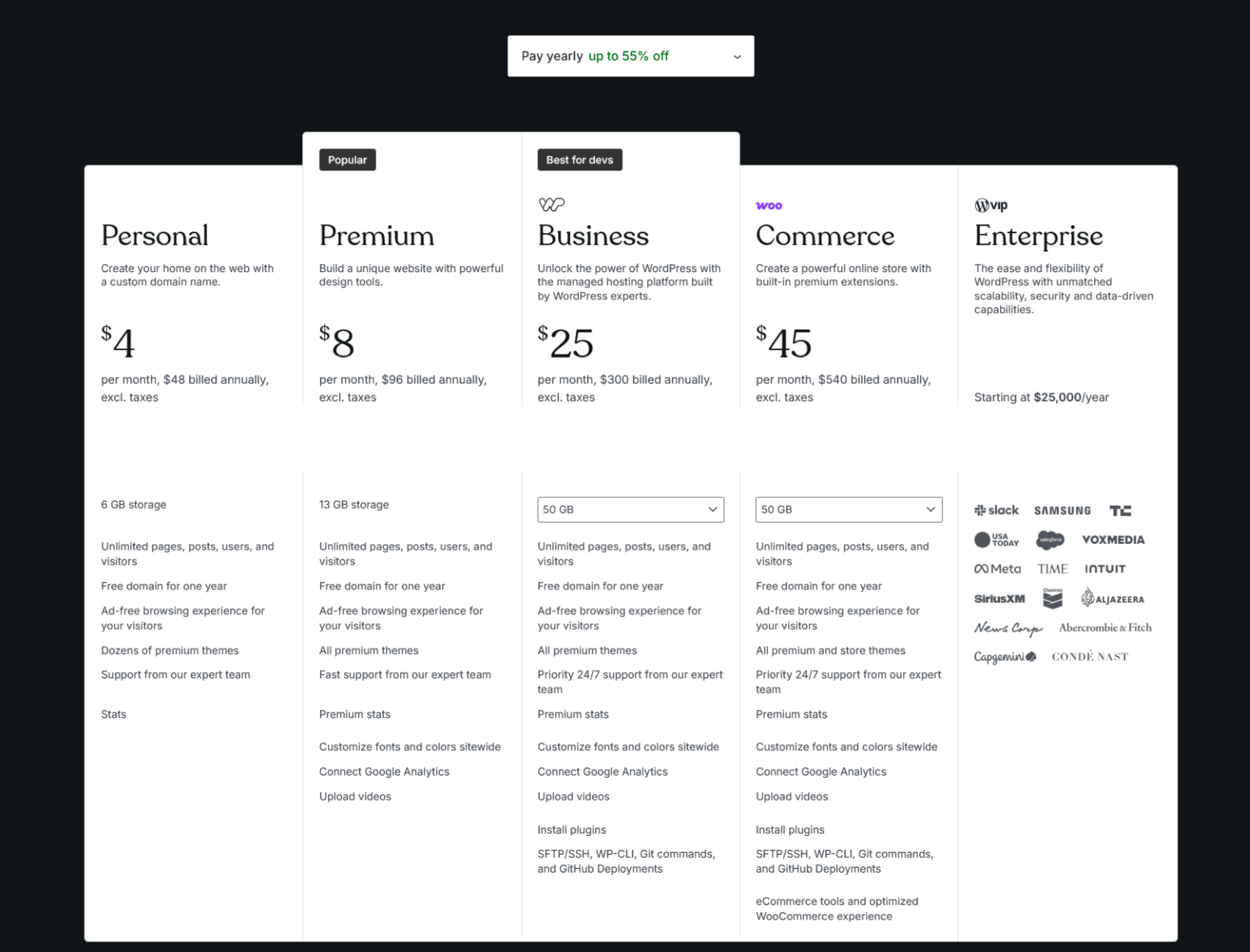
Understanding WordPress.com Pricing: A Comprehensive Guide to Personal, Premium, Business, WooCommerce, and VIP Enterprise Plans
WordPress.com has established itself as a formidable player in the realm of website creation and content management. Its versatility, coupled with an array of customizable features, appeals to individual users, small businesses, and large enterprises alike. However, navigating the different pricing tiers can be complex for potential users.
Overview of WordPress.com Pricing Tiers
Before delving into the specifics of each plan, it is essential to recognize that WordPress.com provides a range of pricing options catering to diverse user requirements. Here’s a snapshot of the main plans:
- Personal Plan – Ideal for individuals looking to create a straightforward website.
- Premium Plan – Suited for users who want advanced features including customization options.
- Business Plan – Designed for small to medium-sized businesses requiring enhanced functionality.
- WooCommerce Plan – Tailored for e-commerce businesses looking to optimize their online store.
- VIP Enterprise Plan – A custom solution for large enterprises with specific needs.
Each plan comes with its own set of features and pricing. Below, we will explore each tier in detail.
1. Personal Plan: Getting Started
Price: $4 per month (billed annually at $48, excl. taxes)
Storage: 6 GB
Key Features:
- Unlimited Usage: Enjoy unlimited pages, posts, users, and visitors, ensuring that your website can grow without limitations.
- Free Domain: Get a custom domain free for the first year.
- Ad-free Experience: Unlock a clean browsing experience without disruptive ads.
- Premium Themes: Access to numerous premium design themes.
- Expert Support: Receive assistance from the dedicated Happiness team for any queries or issues.
- Statistics: Basic stats to track your site’s performance.
The Personal Plan is excellent for bloggers or individuals seeking a simple online presence.
2. Premium Plan: Enhanced Functionality
Price: $8 per month (billed annually at $96, excl. taxes)
Storage: 13 GB
Key Features:
- Unlimited Everything: Like the Personal Plan, this allows for limitless pages, posts, users, and visitors.
- All Premium Themes: Choose from an expansive collection of premium design themes.
- Fast Support: Quick assistance from the Happiness team whenever you need it.
- Advanced Stats: Unlock in-depth statistics, including UTM tracking and device insights.
- Customization: Tailor fonts and colors site-wide to reflect your brand.
- Google Analytics Integration: Easily link your Google Analytics account for insightful data.
- Upload Videos: Upload and display videos without ads and in high definition.
The Premium Plan is perfect for freelancers and creatives looking to build a more personalized brand while maintaining functionality.
3. Business Plan: Professional Tools for Growth
Price: $25 per month (billed annually at $300, excl. taxes)
Storage: 50 GB
Key Features:
- Unlimited Usage: Just like the previous plans, this provides unlimited pages, posts, users, and visitors.
- All Premium Themes: Same access as in the Premium Plan.
- Priority Support: Receive 24/7 priority support from the Happiness team.
- Plugin Installation: Install plugins to enhance your site’s functionality.
- SFTP/SSH, WP-CLI, and Git: Use development tools that are standard in the industry for managing your site easily.
- eCommerce Capabilities: Optimized for business needs, making it suitable for online shops.
The Business Plan is ideal for small to medium-sized businesses aiming for professional growth and feature-rich capabilities.
4. WooCommerce Plan: Perfect for E-commerce
Price: $45 per month (billed annually at $540, excl. taxes)
Storage: 50 GB
Key Features:
- Unlimited Everything: Unlimited pages, posts, users, and visitors.
- All Themes: Access to all premium and store themes.
- Built-in Premium Extensions: Enjoy eCommerce specific features to enhance your online store.
- Priority Support: Access the fastest 24/7 support from the expert Happiness team.
- Advanced Analytics and Customization: Similar features to the Business Plan, refined for online shopping.
- eCommerce Tools: Specifically designed for an optimized WooCommerce experience, ensuring smooth online transactions.
The WooCommerce Plan is tailored for businesses focused solely on eCommerce, providing specialized tools necessary for success in online retail.
5. VIP Enterprise Plan: Custom Solutions for Large Organizations
Price: Starting at $25,000 per year
Storage: Customizable
Key Features:
- Tailored Services: Designed for enterprises with specific needs, allowing for high scalability and customization.
- Dedicated Support: Get round-the-clock support from a dedicated team.
- Enhanced Security: Higher levels of security and maintenance.
- Advanced Analytics: In-depth analytics for tracking critical metrics.
- Custom Solutions: Create tailored plugins and solutions based on business requirements.
The VIP Enterprise Plan provides a comprehensive set of features suited for large organizations with sophisticated content management needs.
WordPress.com offers a range of pricing plans that cater to an array of user needs—from individuals starting a blog to large enterprises managing complex websites. Understanding these tiers can help you select the right plan that fits your specific requirements, ensuring that you maximize your online presence while receiving the necessary support and features. Whether you are looking for simplicity with the Personal Plan, advanced capabilities in the Business Plan, or specialized e-commerce tools with the WooCommerce Plan, WordPress.com stands equipped to meet your needs.
Quick Comparison Table:
| Plan | Price | Storage | Key Features |
|---|---|---|---|
| Personal | $4/month | 6 GB | Unlimited everything, ad-free, premium themes |
| Premium | $8/month | 13 GB | Advanced stats, Google Analytics, video uploads |
| Business | $25/month | 50 GB | Plugin installation, eCommerce capabilities |
| WooCommerce | $45/month | 50 GB | Built-in extensions, tailored for online stores |
| VIP Enterprise | Starting at $25,000 | Custom | Custom solutions, dedicated support |
By evaluating your needs and understanding the details of each plan, you can make an informed decision on which WordPress.com plan is right for you.
The Pros of Using WordPress
1. User-Friendly Interface
One of the standout features of WordPress is its intuitive and straightforward interface. Even those with minimal technical expertise can easily navigate the platform and create their own websites. The content management system (CMS) allows users to add and edit pages, posts, and media files without requiring advanced coding skills.
2. Versatile and Flexible
WordPress is highly versatile, accommodating a wide array of website types—from blogs and portfolios to e-commerce stores and corporate sites. Users can easily switch themes and modify layouts, making the platform highly adaptable to varying needs and preferences.
3. Extensive Theme and Plugin Ecosystem
WordPress boasts thousands of themes and plugins, enabling users to customize their sites according to their specific requirements. Themes allow users to change the visual design, while plugins extend the platform’s functionality. With options available for SEO, social media integration, security, and more, users can enhance their sites significantly without needing to code.
4. SEO-Friendly Structure
Search engine optimization (SEO) is critical for online visibility, and WordPress offers numerous built-in features that support SEO best practices. From customizable URLs to tag and category management, WordPress helps users optimize their content for search engines. Additionally, plugins like Yoast SEO can further enhance a site’s SEO capabilities.
5. Strong Community Support
WordPress has a vibrant and active community. Whether you’re looking for help from fellow WordPress users, guides and tutorials, or forums for troubleshooting, the community support is manifold. This can be particularly beneficial for newcomers who may face challenges during setup or customization.
6. Cost-Effective Solution
For many users, WordPress offers a cost-effective solution for website creation and management. The core software is free to use, and while premium themes and plugins come with a price tag, users can still create a professional-looking site on a limited budget. Additionally, many hosting providers offer affordable WordPress hosting plans.
7. Regular Updates and Security
WordPress continually evolves, with regular updates aimed at improving both functionality and security. This commitment helps protect users’ websites from vulnerabilities and cyber threats. Additionally, the platform’s extensive community frequently uncovers potential security flaws, which are promptly addressed by core developers.
The Cons of Using WordPress
1. Complexity with Code Customization
While WordPress is user-friendly, customizing a website through coding can be challenging for those without technical expertise. Users looking to implement advanced features or complex designs often require a thorough understanding of HTML, CSS, and PHP, making the platform less accessible for some.
2. Frequent Updates
Although regular updates are beneficial for security and performance, they can also be a double-edged sword. Some updates might cause compatibility issues with existing themes and plugins, leading to functionality problems. Users must remain vigilant and often have to spend time troubleshooting after updates.
Final Thoughts
WordPress.com has become a ubiquitous name in the realm of blogging platforms, thanks to its user-friendly interface, extensive features, and a vibrant community that promotes engagement and growth. Whether you are just starting your blogging journey or looking to enhance an existing blog, WordPress.com offers the tools and flexibility necessary to meet varied needs.
As the blogging landscape continues to evolve, WordPress.com stands as a testament to the power of accessible and comprehensible online publishing, allowing users worldwide to share their stories, ideas, and creativity with far-reaching audiences. Whether for personal reflection or professional engagement, WordPress.com remains a formidable choice in the ever-growing world of digital expression.
If you’re ready to build your online home and haven’t yet decided where to pitch your tent, WordPress.com is eager to welcome you into its community. The platform’s commitment to delivering a high-quality experience for all users sets it apart in a crowded market. Start your journey today—making WordPress.com your home on the web might just be the best decision you’ll ever make.
#Managed AWS, Amazon Cloud Hosting Simplified
#All-In-One Inbound Marketing Software.Capture leads from your website and track their activity
#Customer service software.Turn Customers Into Promoters and Service Into Growth